Article
17 min read
Payroll Automation Guide: Benefits, Solutions, and Processes
Global payroll

Author
Shannon Ongaro
Last Update
June 15, 2026

Table of Contents
What is automated payroll?
What payroll automation covers
Manual payroll vs automated payroll
Advantages of automated payroll systems
How to automate payroll processing
Payroll automation software options
How Deel automates payroll for ultimate efficiency
Key takeaways
Manual payroll breaks at scale, so automating payroll is essential to reduce cycle time, prevent errors, and lower compliance risk.
The biggest value of automation comes from an end-to-end, integrated workflow that runs gross-to-net, flags exceptions, and executes payments/filings reliably every cycle.
Deel Payroll delivers end-to-end automation for local and global teams with real-time gross-to-net, built-in compliance, unified approvals and payouts, and payroll experts.
Payroll automation used to be a nice efficiency upgrade. Now it’s a core operating capability, especially for companies managing multiple worker types, pay schedules, and jurisdictions.
The reason is simple: the manual version of payroll doesn’t scale. Spreadsheets, one-off approvals, and rekeying data across systems introduce delays, errors, and compliance risk every cycle.
A modern automated payroll setup changes the shape of the work. Instead of rebuilding payroll from scratch each pay run, your systems do the routine math, tax logic, and payouts automatically. As a result, your payroll team focuses on what actually needs human attention: exceptions, policy changes, and edge cases.
If you’re exploring payroll automation now, you’re likely in one of these situations:
-
Payroll is taking too long each cycle
-
Pay corrections and off-cycle runs are getting frequent
-
You’ve added countries or states and compliance feels brittle
-
Your HRIS, time tool, and accounting system aren’t syncing cleanly
-
Headcount is growing faster than payroll capacity
Automation addresses all of those, but only if it’s implemented thoughtfully. Let’s walk through it.
What is automated payroll?
Automated payroll is software-driven payroll processing that replaces manual work like spreadsheets, disconnected approvals, and rekeying data across tools. It creates a standardized workflow, so every pay run follows the same logic and control gates, reducing errors and making payroll predictable.
Deel Payroll
Run payroll in Deel. Anywhere. Your way.
What payroll automation covers
A fully automated payroll setup typically handles the full payroll lifecycle:
Employee and contractor data management: Onboarding records, salary/rate, bank info, tax forms, benefits elections, deductions
Time, attendance, and leave inputs: Hours worked, overtime, PTO/leave, variable pay, and changes syncing from HR or time tools
Gross-to-net calculations: Earnings, overtime rules, statutory deductions, benefits, garnishments, and employer contributions
Payment execution: Pay schedules triggering direct deposit or local rails. For global teams, multi-currency payouts
Tax payments, filings, and year-end forms: Withholding and compliance outputs by jurisdiction, including annual reporting
Reporting and audit trails: Payroll registers, GL outputs, cost center reporting, and traceable approvals/change logs
Automation doesn’t mean “no humans involved.” It means your systems handle what’s routine reliably, and your team stays in control of the rest.
Manual payroll vs automated payroll
When it comes to manual vs automated payroll, what changes most is where your people spend time. Business-as-usual work is handled by systems, and humans step in only when something is unusual or needs verification.
| Manual payroll | Automated payroll | |
|---|---|---|
| Data intake | HR exports worker data from the HRIS | Worker and earnings data sync into payroll automatically |
| Time and attendance | Payroll downloads time reports from a scheduling tool | Time/earnings flow in automatically from connected systems |
| Data consolidation | Someone merges everything into a spreadsheet | Data is unified in-platform without manual merging |
| Calculations | Calculations are done with formulas that change over time | Gross-to-net runs on predefined rules |
| Error detection | Issues are often found after the fact | System flags outliers for human review |
| Approvals | Finance checks totals manually, often outside the system | Approvals happen in-platform |
| Payments | Payment files are uploaded to a bank portal | Payments and payslips execute on schedule |
| Tax filings | Tax filings are handled separately | Filings generate automatically |
| Reporting | Reports are rebuilt for month-end and audits | Filings and reports generate automatically |
| Corrections | Corrections happen later, sometimes across multiple cycles | Corrections are processed in-cycle with clear traceability |
| Risk and auditability | Every handoff is a risk point, and spreadsheet edits increase drift | Records are stored with audit-ready change history |
Deel Payroll - US
Compliantly run payroll in all 50 states
Advantages of automated payroll systems
When payroll is automated end-to-end, the benefits show up quickly across time, cost, compliance, and employee experience.
Less manual work every pay cycle
The first payoff is time. Automated payroll pulls inputs, calculates pay, produces outputs, and triggers payments without repeated spreadsheet work. Most teams report the biggest time savings in:
Variable pay imports (hours, allowances, bonuses)
Tax calculations across locations
Reconciliation between payroll and accounting
Retro pay and corrections
A pay run that took a day of prep and checking becomes a structured workflow that’s mostly review.
For example, Ladonware saw a 75% reduction in monthly payroll admin time when they switched to Deel. This includes consolidating 50+ international transfers into one bulk payment.
Fewer payroll errors
Manual payroll errors typically don’t come from bad intent, but from volume and drift.
Someone copies the wrong column, a tax rate changes and the spreadsheet doesn’t, or overtime rules are applied inconsistently. Other times, a new hire’s bank details could be missing, or a mid-cycle change isn’t captured.
Automated systems apply rules consistently and run validations before payroll is approved. Instead of catching mistakes after payment, you catch them before they ship.
Design Pickle improved their payroll accuracy by ditching manual processes for automated payroll through Deel.
Before we started using Deel, our payroll process was time-consuming and open to errors due to manual handling. Deel has streamlined our operations, saving us valuable time and reducing the risk of mistakes.
—Hollie Casey,
Director of Global People Operations at Design Pickle
More reliable compliance
Payroll compliance is not very forgiving. Late filings, under-withholding, or incorrect statutory deductions can trigger penalties quickly, especially when you expand into new states or countries.
Payroll automation improves compliance by applying current tax tables automatically, enforcing local payslip formats, and retaining required records for audits. It also helps by tracking approvals and changes for traceability while reducing the need for manual cross-checks.
It doesn’t remove the need for payroll expertise, but it does reduce the chance that everyday work drifts out of compliance.

Guide
Global Payroll Compliance Checklist
Faster pay runs, fewer bottlenecks
Payroll cycles slow down when approvals are scattered or when inputs arrive late. Automation shortens the cycle because inputs sync automatically and calculations happen instantly, with exceptions being flagged earlier than through the manual process.
Approvals also run through a single workflow, and payments are triggered after your team’s approval. Overall, there are fewer “all-hands payroll emergencies”.
With Deel Payroll, Mynewsdesk moved from having a full-time employee dedicated solely to payroll administration to now only needing to spend 4-5 working days on the same task. This amounts to a saving of about 120 hours per month.
We have streamlined and automated a typically very heavy administrative process. This frees up time for us to focus on value-creating activities. This solution has made administration much simpler.
—Sandra Kiesel Lindberg,
Chief People Officer at Mynewsdesk
Easier scaling across regions
Scaling manual payroll is expensive. Each new country or state adds new:
Tax logic
Filing requirements
Payroll calendars
Payment rails
Vendor relationships
Automated payroll engines embed that complexity, so adding headcount or geographies doesn’t require rebuilding the process every time.
Using an automated global payroll provider further enhances that efficiency. 40% of payroll leaders cite process improvement and automation as one of the top benefits of consolidating global payroll with Deel, according to a 2024 Forrester study commissioned by Deel.
Free Resource
Free Global Payroll Guide [With Expert Insights]
Stronger employee experience
Payroll is one of the few HR processes that employees directly feel every cycle. Automation supports a better experience because people get accurate, on-time pay with reliable payslips, with consistent handling of deductions and benefits.
Many automated payroll solutions also offer self-service options for employees, which reduces payroll tickets and keeps employee data fresher, mitigating future errors.
Cleaner reporting and forecasting
Payroll is usually a company’s largest recurring expense and one of the hardest to forecast when the data lives in spreadsheets, local providers, or disconnected systems.
Automated payroll turns payroll from a “black box cost” into a trackable, finance-ready dataset. Finance teams get:
Consolidated labor cost reporting
Predictable GL outputs
Headcount vs payroll variance clarity
Entity or country-level views
Audit-ready payroll registers
Through Deel, FICO improved their reporting and payroll monitoring while eliminating manual work.
Deel is the unquestionable solution to any global payments process…With a single, comprehensive view of global payroll processes, payroll leaders can monitor cycles and statuses with ease, which further eliminates constant manual checks of individual processes.
—Valerie Tazelaar,
Payroll Director, FICO

Template
Get a free payroll journal entry template
How to automate payroll processing
Payroll automation requires implementing a set of workflows that remove repeated manual work and standardize how payroll runs each cycle.
Here’s the practical path:
1. Centralize worker data in one source of truth
Automation only works when worker records are clean and consistent. Put all pay-impacting fields into one system (either your HRIS or your payroll platform):
Employee name and address
Employment type and location
Salary/hourly rate and pay frequency
Tax withholding elections
Benefits and deductions
Bank/wallet details
Cost center/accounting mappings
Start, end, and status changes
Then set governance:
Limit who can edit pay fields
Require approvals for changes
Timestamp edits for audit trails
Avoid shadow records (spreadsheets, side docs)
Most payroll errors start here. Fixing data quality upstream prevents automation from scaling the wrong information.
2. Integrate time, PTO, and expense tools
Anything that affects earnings should flow into payroll automatically:
Time and attendance
PTO/leave management
Expense reimbursements
Commissions and bonuses
Shift/differential trackers
Your system should ingest these inputs at cut-off each cycle without CSV wrangling. If overtime is logged or leave is taken, payroll should receive it automatically.
A quick rule of thumb: If your team touches the same dataset every payroll cycle, it should be integrated.
3. Configure pay rules once (then reuse)
Automation is only as good as your rules. Set your policies inside the payroll engine:
Overtime thresholds by location
Shift differentials
Bonus or commission formulas
Benefit eligibility and employer contributions
Statutory deductions by jurisdiction
Proration for hires/terminations mid-cycle
Retro pay logic and timing
Once codified, these rules apply consistently every pay run. That removes the “human memory” layer from payroll and prevents drift over time.
Explore Deel’s native global payroll engine

4. Turn on automated compliance and tax logic
A strong payroll engine keeps tax tables and statutory rules current and applies them by worker location. That includes multi-state or multi-country logic.
This is a major scaling unlock. Instead of manually tracking tax changes in 10 jurisdictions, the engine carries that burden.
5. Automate gross-to-net and pre-pay checks
Each cycle, the platform should:
Pull approved inputs
Calculate gross-to-net automatically
Run validation checks
Surface only exceptions
Validations usually include:
Missing hours or bank details
Negative net pay
Pay changes outside set thresholds
Unusually high overtime
New deductions without approvals
Location mismatches
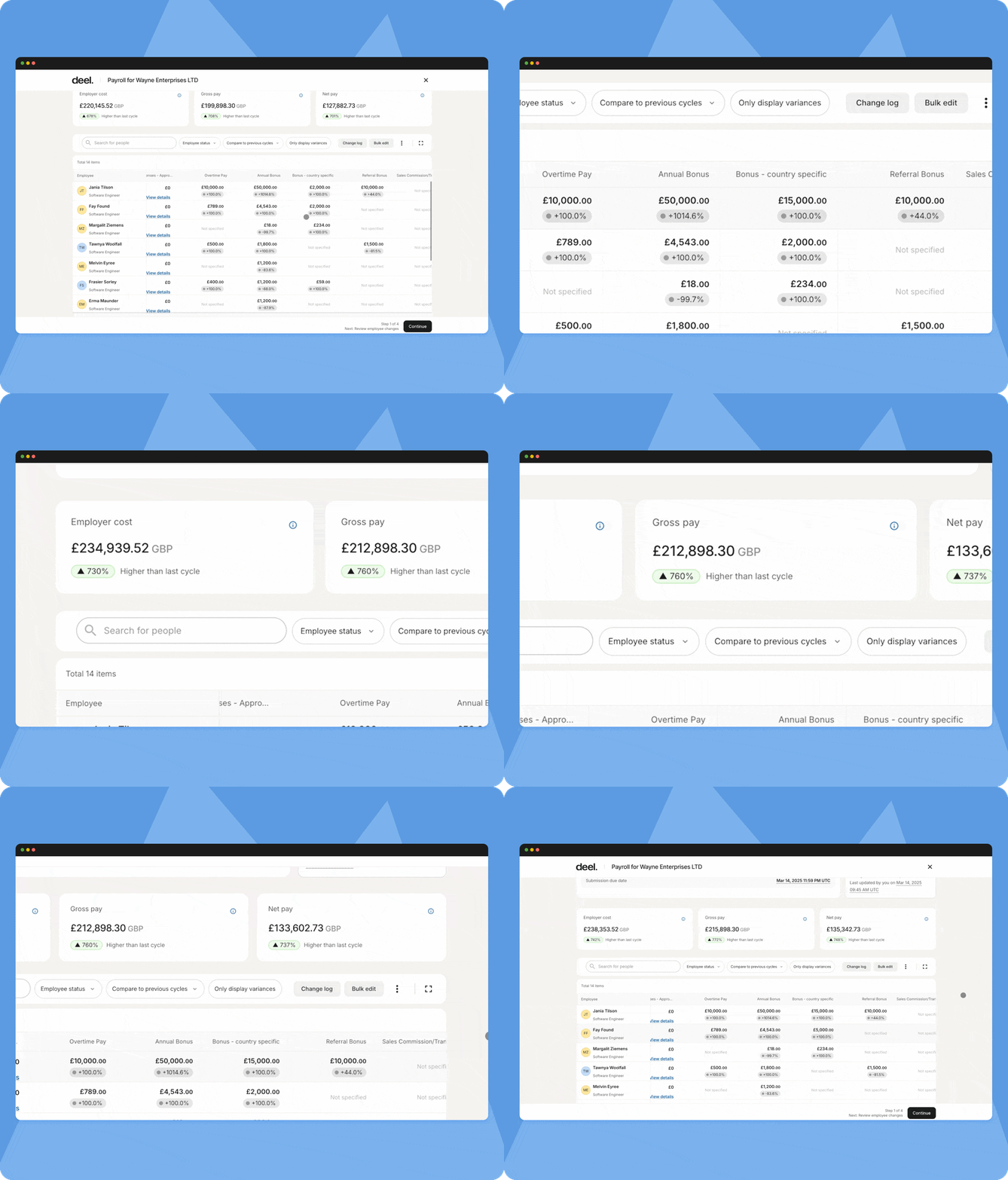
Deel offers real-time gross-to-net calculations, letting teams see payroll impact as soon as changes happen. That’s especially useful for distributed teams with late cut-offs.
6. Set up approvals and exception handling
Automation improves control when approvals are structured. Build:
Two-person review for pay changes
Clear approval path each cycle (HR → Finance → Payroll)
Automatic flags for unusual changes
Someone assigned to handle each flag
Your team should spend time on what’s unusual, not on repeating the same checks every cycle.

Guide
The Case for Global Payroll Consolidation
7. Automate payments and payslip delivery
After approval, payroll should trigger:
Direct deposits or local payouts
Payslip generation
Employee notifications
Self-service access for payslips and updates
That reduces inbound payroll requests and prevents last-minute payment delays.
8. Automate filings, reports, and reconciliation
Post-payroll automation matters as much as pre-payroll:
Tax remittance and filings are submitted automatically where supported
GL journals are pushed to accounting
Payroll reports are published in HR/finance dashboards
Audit trails retain changes and approval history
This closes the loop, so month-end isn’t a second manual payroll cycle.
Payroll automation software options
The best payroll automation software for your team will depend on where and how you employ people, how many systems you already use, and how quickly your complexity is growing.
Here are the main categories:
Payroll software (in-house payroll, automation-supported)
What it is: Your payroll manager (or HR/finance team) runs payroll directly. The platform automates calculations, tax workflows, filings, pay runs, and reporting but you still own the process and approvals.
What’s typically automated:
Pay calculations (salary, hourly, overtime, bonuses, deductions)
Tax withholding and filings (federal/state/provincial; year-end forms)
Direct deposit and pay-day scheduling
Time/PTO imports (hours auto-flow in from time tools)
Employee self-service (paystubs, bank edits, tax forms)
Approval workflows and audit trails
Best for when:
You have payroll expertise in-house
You want complete control and visibility over every pay run
Your payroll complexity is manageable by your team (or you’re okay with configuring rules)
Explore some of the best payroll software for small businesses to learn more.
Payroll services (expert-managed on an automated platform)
What it is: Payroll is run by a specialist provider/team. You provide inputs, they execute payroll on their platform, handle filings/compliance, and support employees. Services can be local (one country) or global (multi-country).
What’s typically automated (behind the scenes):
-
The same payroll engine automations as above (calc, taxes, payments, reporting)
-
Plus service-layer automation like standardized intake, validation checks, exception handling, and compliance alerts
Best for when:
-
You don’t want to staff payroll internally or are scaling too fast
-
Compliance is high-risk (multi-state, union, many jurisdictions, or unfamiliar countries)
-
You want guaranteed SLAs and expert ownership
Learn more about the best mid-market and enterprise software options:
Payroll add-ons inside accounting/HR tools
What it is: Payroll is a module or integration inside software you already use—usually accounting (GL) or HRIS—giving basic payroll automation without a standalone payroll platform.
What’s typically automated:
-
Basic pay runs and tax forms
-
Auto-posting payroll journals into your GL
-
Employee data sync from HR
-
Sometimes basic time/PTO import
Best for when:
-
You’re small/simple and want to minimize systems
-
Payroll requirements are straightforward
-
You care most about accounting/HR data flowing cleanly
With Deel Payroll, you can run payroll your way. Pay teams locally or globally, run payroll on your own or with Deel’s experts
Leading Global Hiring Platform
The world’s #1 platform for global employment

How Deel automates payroll for ultimate efficiency
According to a commissioned 2025 Forrester Total Economic Impact™ study, Deel clients experience significant cost savings and payroll efficiencies due to our automation and services:
80% time saved on payroll vendor management
60% time saved on payroll processing
75% time saved on answering employee queries
Deel is built for teams managing payroll across countries, worker types, and entities without needing a different setup for each location.
Real-time payroll calculations
In 50+ countries and counting, Deel provides real-time gross-to-net. That means as soon as payroll inputs are submitted, you can see employer cost, gross pay, and net pay instantly.
Real-time G2N is especially useful for multi-country payroll where cut-offs and approval windows are tight.
Payroll Connect
Payroll Connect helps teams consolidate third-party payroll results into a standardized view on the Deel platform.
That gives you:
One global payroll reporting format
Consolidated gross-to-net visibility
Less manual spreadsheet aggregation
A clean bridge to future migrations
AI capabilities and agents
Deel’s AI capabilities are designed to reduce routine payroll and HR admin—the tasks that absorb hours each week but don’t require human judgment, such as:
Quick answers to payroll process questions
Guided troubleshooting for common issues
Intelligent routing and escalation support
Retrieval of worker or payroll data faster
Deel AI Workforce tackles the repetitive work that’s slowing you down. The payroll agent reviews every variable, flags anything past your set thresholds, and automatically runs checks so you can pay with confidence.
AI doesn’t replace payroll owners, it just removes the small blockers that slow cycles down.
Human touch
Payroll automation only works when edge cases are handled cleanly. Deel pairs automation with in-house payroll experts and responsive support for country-specific exceptions, compliance questions, and urgent corrections.
That hybrid model matters because global payroll is a combination of software and local expertise.
Syncing between systems and enterprise integrations
Deel is designed to work with your HR and payroll tech stack, not force a rip-and-replace. Worker data can remain mastered in your HRIS while syncing into Deel for payroll processing. Payroll outputs then sync back into finance and reporting tools.
Deel supports enterprise-grade integrations across major HR and finance ecosystems, including Workday and SAP environments, along with common accounting and time tools. Deel is certified as a Workday Global Payroll Cloud (GPC) partner.
Interested in how you can automate your payroll processes with Deel? Book a free 30-minute product demonstration with our experts. You’ll get a one-on-one walk-through of the platform and time to get your questions answered.
Deel Payroll
Run payroll on one platform, globally

FAQs
How do you measure the financial benefit of automated payroll?
Start with what you can measure today:
Admin hours per pay run: How long does payroll prep, calculation, checking, and reporting take?
Off-cycle runs or corrections: How many pay errors require rework?
Compliance incidents or penalties: Any late filings, missed deductions, or audit findings?
Tool consolidation cost: How many payroll tools or providers are you paying for?
Most companies find time savings and reduced corrections are the largest recurring gains. The bigger your headcount or geography footprint, the faster the ROI of AI and automation shows up.
How do you handle employee payroll taxes with automated software?
Automated payroll systems apply current tax tables and statutory deductions automatically based on worker location and earnings. That includes withholding calculations, employer contributions, statutory benefit deductions, and local payslip requirements.
Even with automation, teams should keep a compliance review layer for policy changes or unusual edge cases. The automation handles the “always-true rules.” Humans handle the exceptions.
How do you automate payroll processing in accounting systems?
Payroll automation should extend into accounting so that month-end doesn’t become a manual payroll again.
A good setup includes:
Payroll-to-ERP integration, so payroll results flow automatically into your GL
Mapped cost centers/entities, so labor costs land in the right place
Standardized journals every cycle—wages, taxes, benefits, liabilities
Reconciliation-ready reports, so finance doesn’t rebuild totals
Native integrations are preferable to CSV uploads because they reduce rekeying and reconciliation errors. If CSV is unavoidable, define a strict template and lock versions so your journals don’t drift.
What are the benefits of automated payroll for small businesses?
Small businesses often see automation benefits faster because payroll teams are lean. Automated payroll helps by:
Reducing time spent on each pay run
Lowering the risk of tax or calculation errors
Removing reliance on one person who “knows the spreadsheet”
Handling year-end outputs without extra projects
Enabling self-service for employees and contractors
If you’re a small business hiring globally, automation also makes it so you don’t need a different system for every new country.
What are the benefits of automating the payroll onboarding system?
Payroll onboarding is where many downstream issues start. Automating onboarding ensures pay-impacting data is collected correctly and flows into payroll immediately. As a result, teams usually experience:
Fewer first-pay errors
Faster time-to-pay for new hires
Less payroll rework
Stronger compliance from day one
A smoother employee experience
Shannon Ongaro is a content marketing manager and trained journalist with over a decade of experience producing content that supports franchisees, small businesses, and global enterprises. Over the years, she’s covered topics such as payroll, HR tech, workplace culture, and more. At Deel, Shannon specializes in thought leadership and global payroll content.